


Looking to pass Google core web vitals for your WordPress site? This guide will show you how. We’ll discuss practical tips to improve metrics like Largest Contentful Paint (LCP), First Input Delay (FID), and Cumulative Layout Shift (CLS). Implement these steps to enhance user experience and boost your search engine rankings.
Key Takeaways
- Core Web Vitals, including LCP, FID, and CLS, are critical metrics for evaluating WordPress performance and user experience, impacting search engine rankings.
- Optimizing for each metric requires strategies such as improving server response times, reducing JavaScript execution times, and defining dimensions for media to enhance loading speeds and stability.
- Regular monitoring and maintenance using tools like Google Search Console and PageSpeed Insights are essential to maintain and improve your Google Core Web Vitals scores over time.
Understanding Core Web Vitals
Core Web Vitals are a collection of crucial indicators designed by Google to assess both website performance and the user experience. These metrics, namely Largest Contentful Paint (LCP), First Input Delay (FID), and Cumulative Layout Shift (CLS), play a pivotal role in ensuring an optimal user experience while also contributing to better search engine placement. For superior site functionality, it’s imperative for webmasters to grasp these metrics thoroughly and enhance them accordingly.
Achieving high scores on Core Web Vitals signifies much more than mere statistical success. They reflect the degree of user-friendliness your site provides. A web portal with outstanding Core Web Vitals offers not only swift loading times but also efficient response to users’ actions, along with consistent visual stability as one navigates through its pages. Disregarding these critical aspects could lead to unsatisfactory experiences for visitors, diminishing conversion rates, and potential downgrades in search ranking positions, underscoring why it is vital to concentrate on refining core web vitals.
Google periodically updates what constitutes acceptable Core Web Vitals standards based on changing expectations for online encounters. Remaining updated regarding such changes and regularly analyzing your website’s operational level is essential.
Each aspect influencing those fundamental scores—including elements like hosting services, page building tools/plugins/fonts used, CDN deployment or webpage layout—must be considered carefully. Examining each of the trio of main components – LCP, FID, CLS – will shed light on their respective importance within overall virtual presence enhancement strategies.
Largest Contentful Paint (LCP)
The Largest Contentful Paint (LCP) metric evaluates the duration needed for the most significant visible content on a webpage to fully display, which is crucial in shaping how users perceive page load times. The element being measured could be anything from an image or video to substantial text sections within view. To achieve a favorable LCP score, it’s essential for this primary element to load expediently—ideally within 2.5 seconds—to deliver users a swift and seamless browsing experience.
To optimize your website’s LCP, various factors should be considered: these include refining image sizes, boosting server response efficiency, and reducing resources that block rendering. Implementing a content delivery network (CDN) can aid in diminishing loading durations by hosting static assets on servers geographically nearer to the user.
By concentrating efforts on these key areas and accelerating the loading time of prominent content pieces on your pages, you’re taking critical steps toward enhancing overall site performance and user satisfaction.
First Input Delay (FID)
First Input Delay (FID) is a metric that gauges the duration between a user’s initial interaction with your webpage (such as tapping on a button or clicking on a link) and the browser’s response to that action.
For an optimal FID score:
- Aim for below 100 milliseconds, which contributes to creating an interactive and prompt experience for users.
- Scores ranging from 100 to 300 milliseconds suggest there are areas where responsiveness can be enhanced.
- Exceeding 300 milliseconds in delay may substantially impair the user’s experience.
To ameliorate FID, it is crucial to lessen how much time long tasks occupy the main thread. This improvement can be accomplished by refining JavaScript execution along with curtailing script processing times. Ensuring swift responsiveness during interactions helps deliver an inviting environment free of aggravation for users.
Cumulative Layout Shift (CLS)
Cumulative Layout Shift (CLS) measures the visual stability of a webpage by tracking unexpected shifts in layout during the page load. These shifts can be caused by elements loading at different times, undefined sizes for images, ads, and custom fonts. A good CLS score is below 0.1, ensuring that users don’t experience annoying layout shifts that can lead to missed clicks and a frustrating browsing experience.
Improve your CLS score by defining dimensions for media elements, reserving space for ads and embeds, and optimizing font loading. These steps will help maintain a stable layout, providing a smoother and more predictable user experience.
Measuring Core Web Vitals on Your WordPress Site
To improve your WordPress site, it’s essential to begin by measuring its Core Web Vitals. By using resources such as PageSpeed Insights, Google Search Console, and Chrome DevTools, you can gain valuable insights into how well your site is performing and the quality of user experience it provides. Continuously monitoring these metrics allows for the identification of specific issues so that focused improvements can be made to boost overall performance.
Both field data, which reflects real users’ experiences with your website’s performance, and lab data from a controlled test environment are important in grasping how users interact with your site under actual usage conditions and pinpointing areas where there might be delays or other problems.
We will delve into the available tools and techniques for accurately measuring Core Web Vitals. This examination will provide a deeper understanding of how to analyze these key web vitals effectively through different methods supported by search console capabilities.
Using PageSpeed Insights
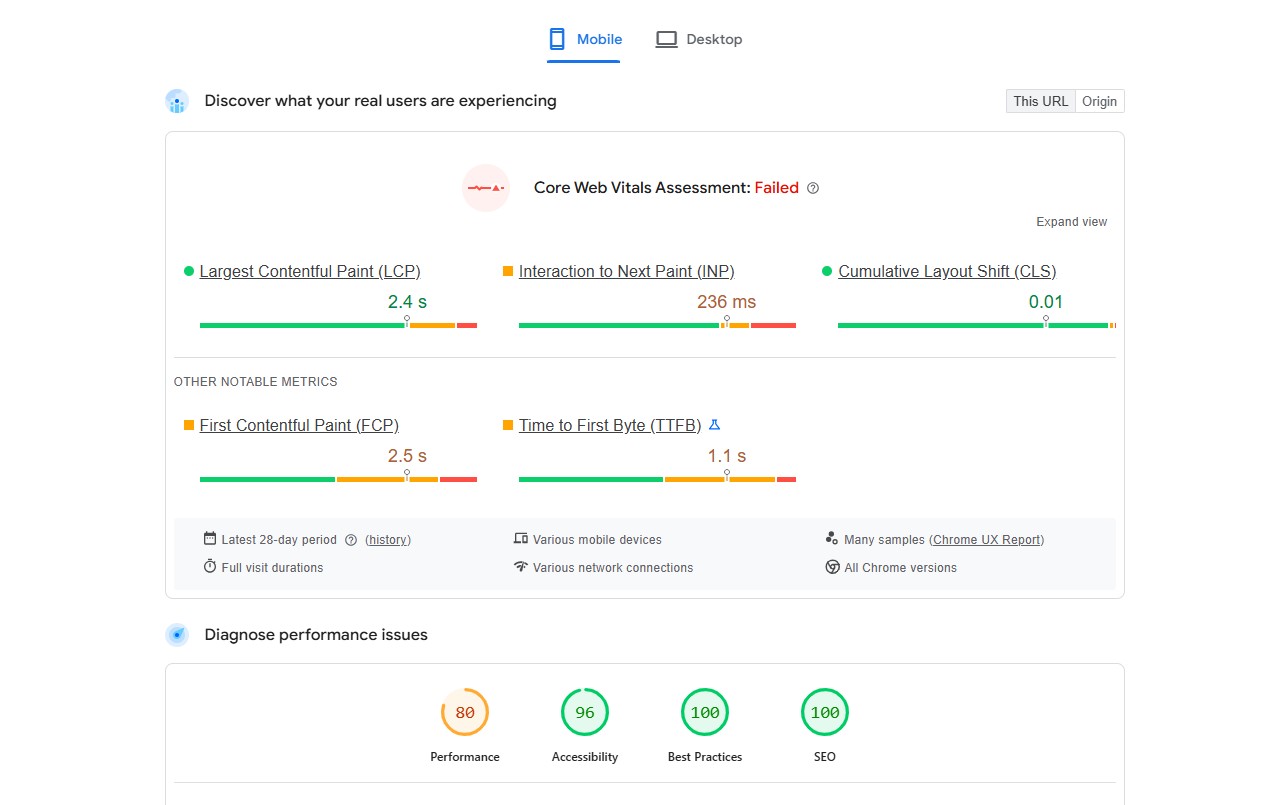
PageSpeed Insights serves as a robust and intuitive instrument for evaluating Core Web Vitals, requiring only the insertion of your website’s URL to deliver an in-depth analysis of its performance across mobile and desktop devices. Atop this web page report is a visual representation indicating the site’s performance score, which acts as an immediate indicator of your site’s general status.
Within the report lies extensive information on all three core metrics associated with Core Web Vitals, along with tailored guidance on how to enhance these areas. The diagnostics section offers additional in